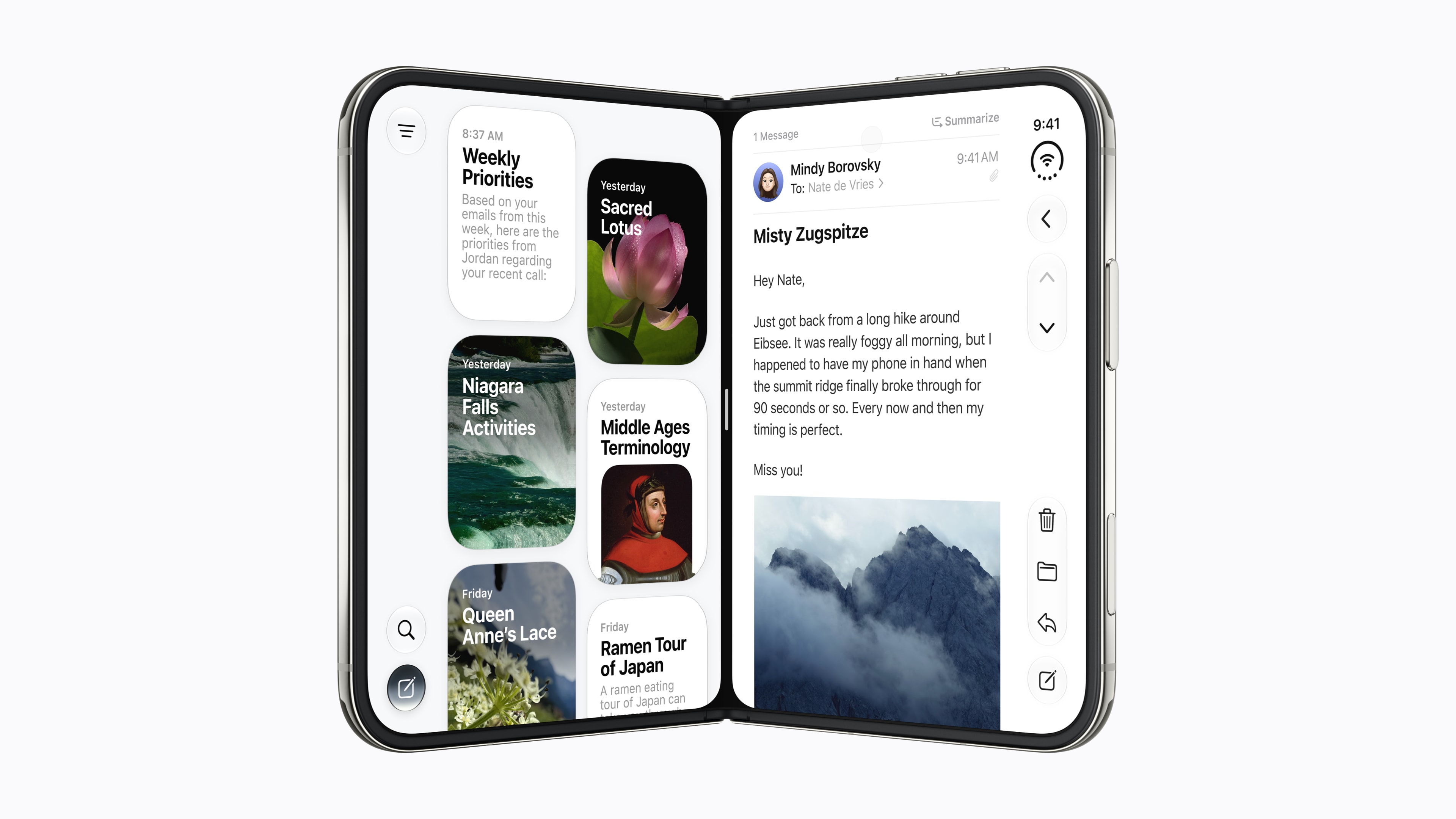
Can the iPhone Duo replace a phone plus a tablet for work? For a lot of mobile work, it can come close. Apple has confirmed the pieces that matter: a 7.6-inch inner display, Split View to run two apps side by side, dual eSIM for a work line and a personal line, and up to 24 hours of typical battery use. What it cannot promise yet is how every work app will use the big screen on day one. This guide sticks to what Apple has confirmed.
Key takeaways
- Apple confirms Split View on the iPhone Duo: two apps side by side on the 7.6-inch inner display.
- The 5.4-inch outer display handles quick tasks without unfolding.
- Dual eSIM runs two active lines, and the Duo stores eight or more eSIMs, so a work line, a personal line, and travel plans can live on one phone.
- Apple rates battery life at up to 24 hours of typical use.
- The limits are real: a $1,999 starting price, 254 grams, and first-generation software.
The work specs at a glance
| Spec | iPhone Duo |
|---|---|
| Inner display (unfolded) | 7.6 inches |
| Outer display | 5.4 inches |
| Battery, typical use | Up to 24 hours |
| Video playback, outer display | Up to 44 hours |
| Video playback, inner display | Up to 31 hours |
| Weight | 254 grams |
| SIM | Dual eSIM (two active, stores eight or more) |
| Software at launch | iOS 27.1 |
All figures are from Apple's iPhone Duo specs and Newsroom announcement.
Two apps at once: Split View
This is the feature that makes the Duo a work device rather than a big phone. Apple says iOS 27 is tailored for the iPhone Duo, and Split View lets you open two apps side by side on iPhone for the first time. Apple also says you can open two windows of the same app, such as two Safari windows, and quickly swap between apps.
In practice, that means the kind of work that usually sends you to a laptop or tablet: reading a document while you reply to a message, keeping a calendar open next to your inbox, or comparing two web pages without flipping back and forth. On a regular phone, each of those is a series of app switches. On the unfolded Duo, both halves stay on screen.
The Duo ships with iOS 27.1. Our article on what iOS version the iPhone Duo ships with explains why you will see both iOS 27 and iOS 27.1, and the update to expect at setup.
Documents and spreadsheets on the big screen
The 7.6-inch inner display is the main reason to consider the Duo for work. Documents, spreadsheets, and slides that are cramped on a phone have more room to breathe, and with Split View you can keep a reference open beside whatever you are editing. For a closer look at the two screens, see our iPhone Duo display explainer.
Apple also says the iPhone Duo will support Apple Pencil with USB-C later this year, on either display, for taking notes, sketching, and marking up documents. Apple has not given a date, so do not buy the Duo for Pencil support today; treat it as a future addition.
One caution: Apple has confirmed Split View and the display, but it has not said which third-party apps will offer layouts designed for the larger screen at launch. iPhone apps should run, but how well your specific work apps use the extra space is something to check once the Duo is in hand.
Calls and meetings
For quick calls, the outer display works like a regular phone without unfolding. For longer video calls, the inner display gives you a bigger view. Apple's iPhone Duo Folio with Kickstand ($129, U.S.) has an integrated kickstand that Apple says supports a wide range of angles for reading, viewing content, or FaceTime, so you can prop the phone up on a desk or a tray table instead of holding it.
Two lines and travel: dual eSIM
The Duo is eSIM-only, with dual eSIM: two active eSIMs at once, and storage for eight or more. For work, that means a work number and a personal number on one phone, both active, with no second device to carry. For travel, you can add a local or travel eSIM plan alongside your regular lines, and keep several profiles stored for different trips.
There is no physical SIM tray, so if you use a physical SIM today, you will need to move that line to eSIM.
Battery for a workday
Apple rates the iPhone Duo at up to 24 hours of typical use. For video, Apple lists up to 44 hours on the outer display and up to 31 hours on the inner display. The gap between those two numbers is the practical lesson: the big screen uses more power, so a day spent mostly unfolded will drain the battery faster than a day on the outer display.
For long travel days, the outer display is your battery saver, and the inner display is for the work that needs it. Our iPhone Duo battery and charging guide covers what Apple specifies for fast charging, so you can top up quickly between meetings.
The honest limits
- Price. The iPhone Duo starts at $1,999 for 256GB. The case for the Duo is convenience, not savings.
- Weight. At 254 grams, the Duo is a substantial phone to carry all day. It is still lighter than carrying a phone and a tablet together, which is the comparison that matters for this guide.
- First-generation software. Split View is confirmed, but Apple has not said how many apps will be optimized for the inner display at launch. Give third-party work apps time.
- Not a laptop. The Duo can cover a lot of reading, replying, and light editing. Long writing sessions, heavy spreadsheets, and anything that needs a keyboard are still laptop work.
Who the iPhone Duo suits for work
The Duo makes the most sense if you already carry a phone and a tablet, or wish you did, and your work is mostly reading, replying, reviewing, and calls. It is a strong fit for people who travel often, people who juggle a work line and a personal line, and anyone who wants two apps on screen without opening a laptop.
It makes less sense if your work lives in a laptop, if one specific app has to work perfectly on day one, or if $1,999 is hard to justify for convenience. Pre-orders opened Friday, October 16 at 8 a.m. ET, and the iPhone Duo goes on sale Friday, October 23.
Frequently asked questions
Can the iPhone Duo run two apps at once?
Yes. Apple confirms Split View on the iPhone Duo, which opens two apps side by side on the 7.6-inch inner display. Apple says you can also open two windows of the same app, such as Safari, and quickly swap between apps.
Can the iPhone Duo replace a phone and a tablet for work?
For many people, it can cover both on the road: a 5.4-inch outer display for quick tasks and a 7.6-inch inner display with Split View for reading and side-by-side work. It is not a laptop, and how well individual work apps use the big screen at launch is not yet known.
Can I have a work line and a personal line on the iPhone Duo?
Yes. Apple lists dual eSIM with two active eSIMs, and the Duo stores eight or more eSIMs. It is eSIM-only and does not take a physical SIM card.
Will the iPhone Duo battery last a workday?
Apple rates it at up to 24 hours of typical use, up to 44 hours of video playback on the outer display, and up to 31 hours on the inner display. Real-world results depend on how much you use the big screen.
Sources
- Apple, iPhone Duo technical specifications: display sizes, battery life, weight, dual eSIM.
- Apple Newsroom, "Apple unveils iPhone Duo," September 2026: iOS 27 tailored for iPhone Duo, Split View, Apple Pencil with USB-C support later this year, iPhone Duo Folio with Kickstand, available with iOS 27.1, $1,999 starting price, pre-order and availability dates.
- Image: Apple.